
The transition from traditional office environments to a decentralized, digital-first workforce has fundamentally altered the way professionals engage with their daily responsibilities. Recent statistics suggest that over sixty percent of remote workers utilize their smartphones as a primary or secondary tool for task management, signaling a shift toward mobile-centric productivity. This evolution is driven largely by the proliferation of high-quality, free applications that offer features once reserved for premium enterprise software suites. By integrating these mobile tools into a daily routine, workers can eliminate geographical barriers and maintain a consistent flow of information regardless of their physical location. The ability to access critical project data, respond to urgent queries, and organize complex schedules from a single handheld device has transformed the concept of the office into a portable reality. Consequently, the challenge now lies in the strategic selection and implementation of these free resources to create a cohesive ecosystem.
Streamlining Operations With Integrated Project Tools
Visualizing Workflow With Digital Boards
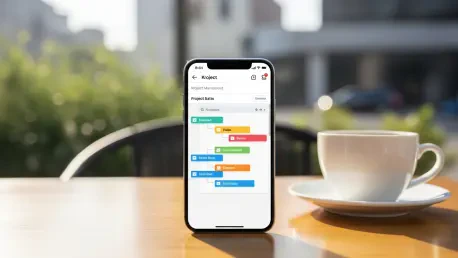
Adopting visual management tools like Trello or Asana on mobile devices allows individuals to maintain a high-level overview of their responsibilities without being tethered to a desk. These applications utilize the Kanban methodology, which organizes tasks into columns representing different stages of completion, providing an immediate visual representation of progress. On a mobile interface, the tactile nature of dragging and dropping cards facilitates a more intuitive interaction with the workflow, making it easier to update task statuses during transit or brief intervals between meetings. This constant accessibility ensures that no detail is overlooked and that the project roadmap remains clear to all stakeholders involved. Furthermore, the free tiers of these applications often include robust features such as due dates, labels, and file attachments, which are essential for maintaining organization. By utilizing these boards, remote professionals can effectively manage their mental bandwidth and focus on execution rather than administrative tracking.
Automation Strategies for Administrative Efficiency
Beyond simple task tracking, the integration of automation within free mobile applications significantly reduces the time spent on repetitive manual updates. Many of these platforms offer automated triggers that can move tasks between columns or send notifications based on specific criteria, such as a looming deadline or a change in priority. For a remote worker, receiving a push notification about a project update allows for immediate pivot or response, maintaining the momentum of the collective effort. This level of connectivity ensures that the digital workspace is dynamic rather than static, reflecting real-time developments as they occur in the field. Utilizing these automated features within the free versions of mobile apps empowers users to operate with the same level of sophistication as large-scale enterprises. The result is a streamlined process where the mobile device acts as a proactive assistant, filtering important information and keeping the most critical objectives at the forefront of the user’s daily routine.
Advancing Efficiency Through Smart Resource Management
Implementation of Structured Focus Intervals
Maintaining focus in a remote environment requires a disciplined approach to time management, and free mobile applications provide the necessary structure to achieve this. Apps that utilize the Pomodoro technique, such as Forest or various minimalist timers, encourage users to work in concentrated bursts followed by short breaks. This method is highly effective for preventing burnout and ensuring that deep work is prioritized over shallow, administrative tasks. On a mobile device, these apps often include gamified elements or strict focus modes that temporarily limit access to distracting social media notifications. By creating a controlled digital environment, these tools help professionals reclaim their attention spans and improve the quality of their output. The portability of these timers means that a structured work session can be initiated in a home office, a library, or a coffee shop with equal ease. This flexibility is key to sustaining productivity across the varied environments that define the modern remote working experience.
Analytical Oversight of Time Allocation
Sophisticated time-tracking applications also offer analytical capabilities that allow users to perform detailed audits of how their hours are spent each day. By logging activities in real time via a mobile interface, professionals can identify patterns of inefficiency or periods of peak performance that might otherwise go unnoticed. Most free versions of these apps generate visual reports and charts that break down time allocation by project, client, or specific task type. This data-driven insight enables individuals to make informed adjustments to their schedules, ensuring that their most valuable hours are aligned with their highest-priority objectives. Over time, this practice leads to a more refined understanding of one’s professional habits, allowing for more accurate project estimation and better work-life balance. Utilizing a smartphone for this purpose ensures that tracking remains consistent, as the device is almost always within reach, facilitating the immediate capture of data as transitions between different types of work occur.
Strategic Evolution of the Personal Digital Workspace
Strategic implementation of a tailored mobile app ecosystem provided a definitive advantage for professionals navigating the complexities of remote work. By selecting tools that addressed specific bottlenecks in communication, organization, and time management, individuals were able to cultivate a high-performance environment that operated independently of traditional office infrastructure. The successful integration of these free resources required a deliberate focus on interoperability, ensuring that data flowed smoothly between different platforms to maximize utility. Moving forward, the emphasis should shift toward regular audits of these digital tools to ensure they continue to meet evolving professional needs. Professionals are encouraged to explore emerging features within their existing apps and stay informed about new releases that offer enhanced security or better integration options. Ultimately, the mastery of mobile productivity lies in the ability to adapt these free technologies to personal workflows, creating a resilient system that supports sustained professional growth.