
The evolution of search from a list of links to a collaborative workspace marks a significant milestone in the software industry. With Google expanding access to Canvas in AI Mode to all U.S. users, the distinction between “searching” and “creating” is becoming increasingly blurred. Vijay Raina, an expert in enterprise SaaS and software architecture, joins us to discuss how these tools are being integrated into the daily workflows of millions. We explore the technical shift from experimental Google Labs prototypes to robust productivity features that support everything from creative writing to real-time coding.
Canvas has moved from an experimental phase to a standard feature in AI Mode. How does this broad integration change the daily research workflow for the average user, and what specific steps should they take to leverage the Google Knowledge Graph within the side panel?
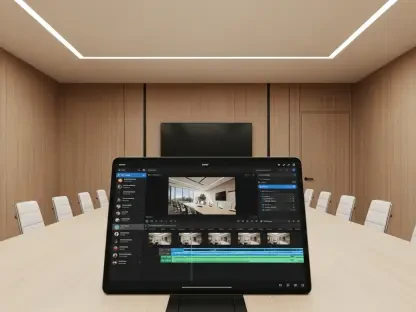
The shift of Canvas from an experimental phase to a standard feature fundamentally changes the research landscape by moving it from a passive retrieval process to an active organizational one. Users no longer just consume snippets; they open a side panel via the tool menu to synthesize information from the web and the Google Knowledge Graph into a cohesive document. To leverage this, a researcher should start by selecting the “plus” icon in AI Mode to launch the workspace, allowing them to pull in authoritative data points while drafting. This integration feels seamless, as the side panel provides a persistent space where one can see the research and the working draft simultaneously, eliminating the cognitive load of switching between browser tabs.
Users can now transform dense research reports into dynamic formats like audio overviews or interactive quizzes. What are the practical advantages of these conversions for educators, and how can they use the feedback loop to refine creative writing drafts or study guides?
For educators and content creators, the ability to transform a static research report into a web page or an interactive quiz is a game-changer for engagement. This process allows for a variety of learning styles to be addressed simultaneously, such as using the audio overview feature to cater to auditory learners or the quiz generator to provide immediate retrieval practice for students. By uploading class notes or existing sources, a user can create a feedback loop where they ask the AI to critique a creative writing draft or suggest improvements to a study guide. This creates a rhythmic workflow of generation and refinement, making the daunting task of summarizing dense information feel more like a conversation with a knowledgeable collaborator.
Describing an idea to an AI can now result in a functional app or game with viewable underlying code. What is the technical process for testing these prototypes in real-time, and how does chatting with Gemini help a non-coder refine the logic of their creation?
The technical process of turning a simple description into a functional app or game is where the power of the Gemini 3 model truly shines, especially with its massive 1 million-token context window. A non-coder can describe their vision, and Canvas will generate the underlying code while providing a live preview to test the functionality immediately. If the game’s logic isn’t quite right, the user simply chats with the AI to describe the necessary changes, and the code updates in real-time. This iterative testing process feels incredibly empowering, as it allows someone without a background in software development to peek under the hood at the code and understand the structural logic behind their creation.
Different AI platforms take various approaches to triggering workspace features, with some requiring manual selection via a tool menu. Why is a direct, user-initiated interaction preferred for complex projects, and what impact does this have on organizing long-term research compared to automated prompts?
While some platforms like ChatGPT trigger features automatically, the direct, user-initiated interaction used by Google and Anthropic is often preferred for more complex, long-term projects. By manually selecting the Canvas option from the tool menu, the user remains the primary architect of the workspace, ensuring that the AI doesn’t misinterpret a simple query for a request to start a large-scale project. This deliberate choice allows for better organization of deep research, as it prevents the workspace from becoming cluttered with automated prompts that might not be relevant to the user’s specific goals. In a high-stakes professional or academic environment, having that level of control over when and how the tool activates is essential for maintaining a clear and focused workflow.
What is your forecast for Canvas in AI Mode?
I expect Canvas to become the central hub for the “new web,” where the reach of Google Search places these sophisticated tools in front of billions of users. As more people move beyond basic queries, we will likely see the 1 million-token context window become the industry standard for managing massive, interconnected projects. My forecast is that Canvas will eventually bridge the gap between AI search and professional development environments, making high-level software prototyping accessible to every person with a Google account. We are witnessing the birth of a platform that doesn’t just find information but builds the solutions users are looking for in real-time.